AI Provider Configuration
Eneo is model-agnostic and supports 60+ AI providers through a unified routing layer powered by LiteLLM. Providers and models are managed per-tenant through the Admin UI — no environment variables or server restarts required.
Overview
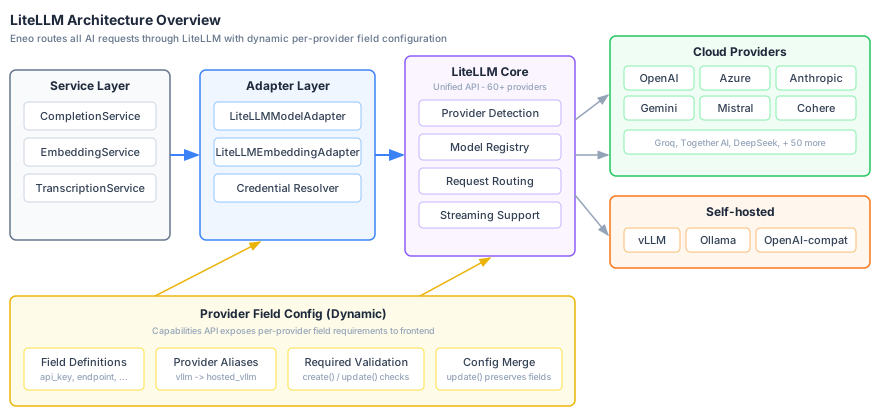
Eneo routes all AI requests through LiteLLM, a unified API layer that normalizes provider differences for completions, embeddings, and streaming. Common providers include:
- OpenAI (GPT-4o, GPT-4o-mini, GPT-5)
- Anthropic (Claude 3.5, Claude 3.7, Claude Haiku 4.5)
- Azure OpenAI Service (GPT-4o, GPT-5 variants)
- Google Gemini (Gemini 1.5, Gemini 2.0)
- Mistral, Cohere, and many more
- Self-hosted (vLLM, or any OpenAI-compatible API)
See the full LiteLLM providers list for all supported providers.
Architecture
Eneo routes all AI requests through LiteLLM, a unified API layer that supports 60+ provider APIs with consistent interfaces for completions, embeddings, and streaming.
How Provider Routing Works
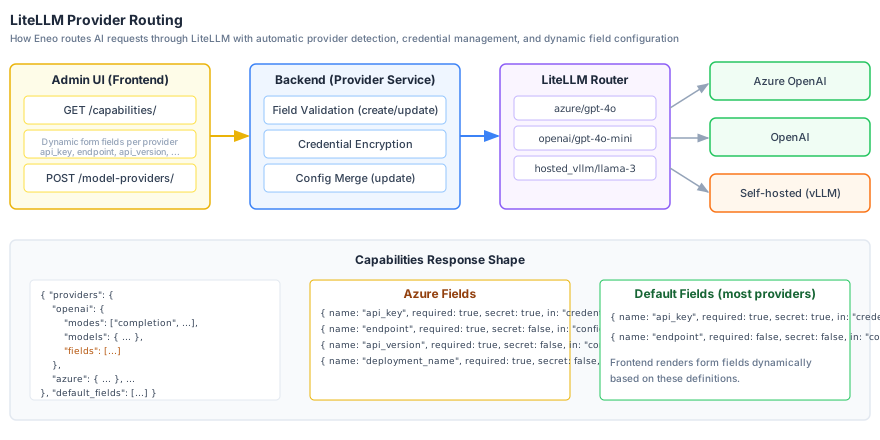
Every model belongs to a provider record, and Eneo always builds the LiteLLM route as <provider type>/<model name> from that record. The prefix is never typed by hand and there is no unprefixed default route:
| Prefix | Provider | Example |
|---|---|---|
azure/ | Azure OpenAI | azure/my-gpt-4o-deployment |
openai/ | OpenAI Direct | openai/gpt-4o |
anthropic/ | Anthropic | anthropic/claude-3-5-sonnet |
hosted_vllm/ | Self-hosted (OpenAI-compatible) | hosted_vllm/meta-llama/Llama-2-7b |
For Azure OpenAI the model name in the route is the deployment name, not the underlying model, so name Azure models after their deployments.
How Providers Are Supported
Eneo uses LiteLLM’s built-in model registry to determine which providers and models are available. This means:
-
If a provider exists in LiteLLM — it shows up automatically in Eneo’s Admin UI when adding models. No code changes needed.
-
If a provider is missing from LiteLLM — you can still connect it using any provider type that speaks the OpenAI protocol. For example, use
hosted_vllm,openai, orollamaand point it at your endpoint. The only requirement is that the server exposes an OpenAI-compatible API (/v1/chat/completions,/v1/embeddings). -
Want a provider to appear with its own name and model list? Send a PR to the LiteLLM project to add it to their model registry. Once merged, it will automatically appear in Eneo with its models listed.
The Admin UI fetches capabilities from LiteLLM’s model registry on load, including supported models, context windows, and feature flags (vision, tool use, reasoning). This data is always up to date with your installed LiteLLM version.
Adding a Provider (Admin UI)
Providers are added per-tenant through the Admin UI wizard. Each tenant can configure their own providers with isolated credentials.
Step 1: Open the Provider Wizard
Navigate to Admin → Models and click Add Model. The wizard guides you through:
-
Select provider type — Choose from the list of available providers (OpenAI, Azure, Anthropic, Gemini, Mistral, Cohere, vLLM, etc.). You can mark frequently used providers as favorites.
-
Enter credentials — The form adapts dynamically based on the selected provider. The backend exposes required fields per provider type via the capabilities API. Common patterns:
- Most cloud providers (OpenAI, Anthropic, Gemini, Mistral, Cohere, etc.): API key + optional endpoint
- Azure OpenAI: API key, endpoint, API version, deployment name
- Self-hosted (vLLM, Ollama, etc.): API key + endpoint URL
- Any other LiteLLM-supported provider: API key + optional endpoint (fields are determined automatically)
-
Select models — The wizard queries the provider’s API (or LiteLLM’s registry) to list available models with metadata (context window, vision support, etc.). Select the models you want to enable.
Step 2: Test Connectivity
After adding a provider, use the Test button to verify that credentials are valid and the endpoint is reachable. The system makes a minimal API call to confirm connectivity.
A stored API key is only ever sent to the endpoint it was entered for. When you change a provider’s endpoint (scheme, host, port or base path), the edit dialog asks for the API key again and the backend rejects the change unless a new key is supplied. Renaming a provider, toggling it, or re-entering the same endpoint in a different spelling does not require the key. Providers configured without a key can change endpoint freely.
Step 3: Enable Models for Users
Once a provider is configured and models are added, tenant admins can enable specific models for their organization through the Models page.
Custom & Self-Hosted Providers
For self-hosted inference servers or providers not natively listed in LiteLLM, use any provider type that speaks the OpenAI protocol — such as hosted_vllm, openai, or ollama — and point it at your own endpoint. The key requirement is that the server exposes an OpenAI-compatible API.
Supported Inference Servers
- vLLM — High-performance inference with OpenAI-compatible API
- Ollama — Local model runner
- LocalAI — OpenAI-compatible local inference
- Text Generation Inference (TGI) — Hugging Face’s inference server
- Any OpenAI-compatible endpoint
Configuration
When adding a custom provider in the Admin UI (e.g., using hosted_vllm, openai, or ollama):
- Name: A descriptive name (e.g., “Internal vLLM Cluster”)
- API Key: Your server’s API key (if authentication is enabled)
- Endpoint: The base URL of your server (e.g.,
http://vllm-server:8000)
The system will query your server’s /v1/models endpoint to discover available models automatically.
Only hosted_vllm treats the API key as optional. Every other provider type without its own field definition — including openai and ollama — requires an API key and treats the endpoint as optional. For an unauthenticated server, either use hosted_vllm or enter a placeholder key.
Hardware Requirements
| Model Size | VRAM Required | Recommended GPU |
|---|---|---|
| 7B | 16GB | RTX 4090, A10 |
| 13B | 32GB | A100-40GB |
| 70B | 140GB | 2x A100-80GB |
Benefits
- Local data path: prompts and files stay inside your infrastructure when the provider is self-hosted
- No API Costs: Only hardware/cloud compute costs
- Customizable: Fine-tune and deploy custom models
- Low Latency: No network round-trip to external APIs
Outbound headers
A provider can send extra HTTP headers with every request it makes. A value can be fixed text, or resolved per request from the attributes your identity provider provisions for the user (see Whose attributes are sent), or a mix of both. This is useful when the endpoint is a gateway, proxy or internal service that treats callers differently, for example to rate-limit per department or route by organisational unit. Eneo gives the values no meaning; what the receiving endpoint does with them is up to you.
Tenant administrators configure headers under Outbound headers when they add or edit a provider in Admin → Models.
Where headers are sent
Outbound headers are available for the self-hosted OpenAI-compatible provider type (hosted_vllm, shown as vLLM). Other provider types show that headers are not available.
| Request | Headers sent? |
|---|---|
| Every completion (chat, assistants, apps and other text generation), streamed and not, including tool-call follow-ups | Yes |
| Embeddings, for search queries, uploads and website crawls | Yes |
| Transcription | No: the request is blocked while headers are configured, because LiteLLM does not forward headers on this route. Use a separate provider for transcription models |
| Image generation | No: the request is blocked while headers are configured, because it is not verified that LiteLLM forwards headers on this route. Use a separate provider for image models |
| Connectivity tests, model validation and model listing in the admin UI | No; these are not user traffic |
A provider with no headers configured sends exactly what it sent before.
Values and dynamic values
A value is one text field: fixed text such as eu-north, a dynamic value such as {{user.department}}, or a mix such as tier-{{user.organization}}. Pick dynamic values from the list next to the field. The editor flags a dynamic value it does not recognise before you save.
| Dynamic value | Source | Identifies a person? |
|---|---|---|
{{user.employeeNumber}} | SCIM Enterprise User employeeNumber | Yes |
{{user.externalId}} | The user’s SCIM externalId | Yes |
{{user.costCenter}} | SCIM Enterprise User costCenter | No, describes a group |
{{user.department}} | SCIM Enterprise User department | No, describes a group |
{{user.division}} | SCIM Enterprise User division | No, describes a group |
{{user.organization}} | SCIM Enterprise User organization | No, describes a group |
The SCIM attributes are only available if your identity provider sends them. See Enterprise User attributes. Expect some users to have no value.
Organisational attributes describe a group, but a small enough group identifies its members, and a recipient that compares values with request times can narrow them further. Assess this against your own organisation’s structure before sending them to a third party.
A provider can have up to 10 headers. A header name must be a valid HTTP header name (a token as defined in RFC 9110) of at most 64 bytes, and a configured value can be up to 1,024 characters.
Encoding: what reaches the wire
| Encoding | What is sent | Use for |
|---|---|---|
| Percent-encode (default) | The value URL-encoded. The receiver decodes it with urllib.parse.unquote or equivalent | Attribute values. The only mode that carries characters such as å, ä and ö |
| Send exactly as written | The value byte for byte. Only plain ASCII is allowed | Credentials and values the receiver compares exactly |
| Resolved value | Percent-encoded | Exactly as written |
|---|---|---|
Sales & Marketing | Sales %26 Marketing | Sales & Marketing |
Miljö och hälsa | Milj%C3%B6 och h%C3%A4lsa | Request blocked (not ASCII) |
IT/Infra | IT%2FInfra | IT/Infra |
sk-bf-aGVsbG8= | sk-bf-aGVsbG8%3D | sk-bf-aGVsbG8= |
When a dynamic value is missing
| Setting | Effect |
|---|---|
| Leave the header out (default) | The header is not sent; the request goes ahead |
| Send a fallback value | A fixed fallback is sent instead. It is encoded the same way as the value, so Övrigt is sent as %C3%96vrigt with percent-encoding, and it cannot contain dynamic values |
| Block the request | The request is refused before it leaves Eneo |
If one dynamic value in a mixed value is missing, the setting applies to the whole header: a partial value like tier- is never sent.
Block the request denies service to every user who lacks the attribute. That includes service keys, users whose identity provider has not filled in the attribute, and newly provisioned users until the next sync. The recommended setting is to leave the header out and give the receiving side a default.
Blocked requests
A request is also blocked, whatever the missing-value setting, when:
- a resolved value contains a line break, a tab, or another control or invisible character, such as a no-break space or a zero-width space. Percent-encoding does not make these acceptable, so a directory value containing one blocks that user’s requests until it is corrected;
- a resolved value is non-ASCII with Send exactly as written;
- a value is too long once encoded: 1,024 bytes per header value, and 4,096 bytes for all header names and values together.
Eneo never repairs or shortens such a value.
The user sees a message asking them to contact an administrator. The backend logs outbound_headers.request_blocked at WARNING with the provider id, header name, reason and user id. A missing dynamic value is logged as outbound_headers.unresolved at DEBUG. Neither log line contains a header value.
Secret headers
Tick Secret for a header that carries a credential. Its value and fallback are encrypted when saved and never shown again. To keep a secret value when you edit the provider, leave it as it is; to replace it, choose Change, and choose Cancel and keep the current value to go back. Turning Secret off requires entering the value, and any fallback, again.
Like a stored API key, a secret value is only sent to the endpoint it was entered for. When you change the provider’s endpoint, enter the value and any fallback of each secret header again, or remove the header; otherwise the change is rejected. The edit dialog names the headers to enter again as soon as you change the endpoint.
If a stored secret can no longer be read, for example because ENCRYPTION_KEY changed, every user’s requests to the provider are blocked and the preview says why. Saving the provider while keeping that header is refused with the header named: enter its value, and any fallback, again, or remove the header.
Where headers may go
- Headers are only sent to the provider’s explicitly configured endpoint, and the destination is checked again on every request. An endpoint with credentials in the URL (
https://user:pass@…) is refused. - Eneo does not follow redirects on these requests, so a redirect cannot carry the headers somewhere else.
- Plain
httpendpoints are allowed, because many internal vLLM servers use them, but header values, secret ones included, then travel unencrypted. Usehttpsfor any endpoint that is not on the same host. The editor warns when a secret header, or a header carrying a user attribute, is configured on a plainhttpendpoint that is not loopback. - A deployment can restrict destinations further with
OUTBOUND_HEADERS_ALLOWED_DESTINATIONS, a JSON list of URLs (see Deployment). Each entry is compared with the provider’s endpoint URL, not with the path of individual requests. Matching is exact on scheme, host (case-insensitive, no suffix matching) and port, and an entry’s path must match the start of the endpoint’s path on/boundaries. The entryhttps://gateway.internal/v1allows the endpointshttps://gateway.internal/v1andhttps://gateway.internal/v1/tenant-a, but nothttps://gateway.internalorhttps://gateway.internal/v1beta. - In a multi-tenant deployment, set
OUTBOUND_HEADERS_ALLOWED_DESTINATIONSso that tenant administrators can only send headers to endpoints you have approved.
If a provider’s endpoint stops being an allowed destination, for example after the allow-list changes, every user’s requests to that provider are blocked. Changing its headers or moving it to another endpoint that is not allowed is refused, but you can still rename or deactivate it, change it to an allowed endpoint, or remove its headers.
Some header names are reserved and cannot be configured: Authorization, Proxy-Authorization, Proxy-Authenticate, Cookie, Set-Cookie, Host, Content-Length, Content-Type, Transfer-Encoding, Connection, Keep-Alive, Upgrade, Expect, TE, Trailer, api-key, Accept, Accept-Encoding, User-Agent, traceparent, tracestate, baggage and X-Eneo-Tenant-Id. Names are case-insensitive, so X-Org and x-org count as the same header. Names starting with X- are recommended.
X-Eneo-Tenant-Id is reserved for a possible future tenant label set by Eneo itself. Eneo does not send it to model providers today, unlike MCP servers, which receive it with the other identity headers.
Preview
When you edit a provider that has headers, Preview for a user shows what the saved configuration would send for a chosen user in your organisation, and whether their requests would be blocked. Secret headers show only whether they resolved. Previews are recorded in the audit log while audit logging is on and the Admin Actions category and this action are enabled, which is the default (see Configure what gets logged).
Audit
Changes are recorded as model_provider_headers_updated, with secret values masked; the record says whether each value and fallback changed, and ticking Secret alone changes neither. Changing the endpoint of a provider that sends headers is recorded as model_provider_destination_changed, with any credentials in the URL removed. Writing the same endpoint differently, such as with a trailing slash or another letter case in the host, is not a change. Previews are recorded as model_provider_headers_previewed, without the resolved values. Like every audit event, these follow your tenant’s audit configuration.
Whose attributes are sent
- A request a user makes, such as a chat message or a search, uses that user’s attributes.
- A file upload is processed with the attributes of the user who uploaded it.
- A scheduled website crawl uses the attributes of the website’s owner. A crawl started by hand uses the attributes of the user who started it.
- A SharePoint integration connected as a tenant app is not tied to a person, so a synchronisation triggered by a SharePoint webhook uses the attributes of the tenant’s oldest administrator: the earliest-created active or invited user with the admin permission.
When changes take effect
Each request and each upload job reads the header configuration and the user’s attributes when it starts. A website crawl captures the header configuration and the attributes when it starts and keeps them until it finishes, the same way it keeps the provider’s credentials. Changing or removing a header, or removing an attribute in your identity provider, therefore does not affect a crawl that is already running, and a crawl can run for up to CRAWL_MAX_LENGTH (10 hours by default).
Headers are assertions, not verified facts. An administrator chooses every fixed value, so a receiver that uses these headers for access control needs its own trust model. If several Eneo tenants share one gateway, give each tenant its own gateway credential and have the gateway work out the tenant from that credential. Never work it out from a header.
Two operational notes. LiteLLM’s own debug logging (LITELLM_LOG=DEBUG, off by default) prints complete provider requests, header values included, so keep it off in production; Eneo logs a warning, once per process, if it is on when headers are sent. LiteLLM response caching must stay disabled (Eneo does not enable it): header values are not part of its cache key, so a cached answer would bypass them.
Credential Management
All provider credentials are managed per-tenant and encrypted at rest. There are two ways to manage credentials:
Admin UI (Recommended)
Use the Admin UI provider wizard to add, update, or remove provider credentials. This is the primary method for managing providers. Discovering models, testing a provider connection, and validating a model with its stored credentials require an organization administrator.
Sysadmin API
For automation or bulk operations, use the sysadmin credential API. It is only mounted when TENANT_CREDENTIALS_ENABLED=true (otherwise it answers 404), and {provider} must be one of openai, anthropic, azure, mistral, ovhcloud, gemini, or cohere. The body accepts api_key (required) plus endpoint, api_version, and deployment_name for Azure:
# Set provider credentials for a tenant
curl -X PUT "https://api.your-domain.com/api/v1/sysadmin/tenants/{tenant_id}/credentials/{provider}" \
  -H "X-API-Key: your-super-admin-api-key" \
  -H "Content-Type: application/json" \
  -d '{
    "api_key": "your-provider-api-key",
    "endpoint": "https://api.provider.com/v1"
  }'

# List tenant credentials (masked)
curl "https://api.your-domain.com/api/v1/sysadmin/tenants/{tenant_id}/credentials" \
  -H "X-API-Key: your-super-admin-api-key"

# Remove provider credentials
curl -X DELETE "https://api.your-domain.com/api/v1/sysadmin/tenants/{tenant_id}/credentials/{provider}" \
  -H "X-API-Key: your-super-admin-api-key"
Where runtime credentials come from
Runtime LLM calls resolve their credentials exclusively from the tenant’s provider records (the providers created in Admin → Models). A model without a provider is rejected, and the provider’s credentials are never substituted with global ones. Provider API keys in .env (OPENAI_API_KEY, ANTHROPIC_API_KEY, and so on) are not read for completions or embeddings; they only seeded the one-time migration that created the first tenant providers from global models, together with any credentials that had been stored through the sysadmin credential API.
TENANT_CREDENTIALS_ENABLED still exists, but it does not select between a shared and a strict credential mode at runtime. Today it gates the sysadmin credential API above and makes an ENCRYPTION_KEY mandatory at startup. Credentials stored through that API are kept on the tenant record, separate from the provider records that runtime calls use.
Encryption Details
| Aspect | Details |
|---|---|
| Algorithm | Fernet (AES-128-CBC + HMAC-SHA256) |
| Key Source | ENCRYPTION_KEY environment variable |
| Storage | Encrypted in database, masked in API responses |
Backup your ENCRYPTION_KEY: If lost, all stored credentials become unrecoverable and must be re-entered for each tenant.
Generate an encryption key:
uv run python -m eneo.cli.generate_encryption_keyCost Management
Model Pricing in Eneo
Each completion model can carry an indicative input and output price. Admins enter it per million tokens in the model wizard; Eneo stores it per token on the model record and leaves it empty when the price is unknown. Admins always see prices. Regular users see them (for example in the model selector) only while the organization-level Show model pricing toggle on the Admin overview page is on; it is on by default.
Set Budget Alerts
For cloud providers, set up budget alerts:
- OpenAI: Usage limits in account settings
- Azure: Budget alerts in Azure Cost Management
- Google: Budget alerts in Google Cloud Console
Monitor Usage
Check your usage regularly:
- View API call metrics in Eneo’s admin panel
- Review provider dashboards
- Set up automated alerts
Optimize Costs
- Use smaller models for simple tasks
- Cache repeated queries, except on providers with outbound headers: a cached answer would bypass them
- Use local models for development/testing
- Set context length limits
Troubleshooting
When a provider fails
When a call to a model provider fails, chat users see a message that names the cause instead of a general error. The message says whether the provider or Eneo is at fault and whether trying again can help. API clients get the same reason as code in the error body or in the stream’s error event.
| Reason code | When | Where the fault is | Does retrying help |
|---|---|---|---|
provider_unavailable | The provider answered with a server error or an overload status (500, 502, 503, 529) | Provider | Usually, after a while |
provider_timeout | The provider request timed out, or its gateway timed out (408, 504) | Provider, overloaded or hanging | Usually |
provider_unreachable | Eneo could not open a connection: DNS failure, refused connection, TLS failure or connect timeout | The provider is down, or the network path from Eneo is blocked | When the provider recovers; check the endpoint and outbound network if it persists |
provider_connection_lost | The connection broke before the answer was complete | Provider or network path | Yes |
provider_rate_limited | The provider refused the request with 429 | Provider quota or your usage tier | After a short wait |
provider_model_not_found | The provider answered 404 for the configured model | Model configuration: the model was removed or renamed, or the deployment name is wrong | No; correct the model under Admin → Models |
provider_rejected_request | The provider refused the request as invalid (400) | The request or the model configuration | No |
stream_error | Eneo failed while handling the answer | Eneo | Report it with the time it happened |
Anything else keeps the general provider_error message. provider_unreachable alone does not prove that the provider is down: if every provider fails this way at the same time, check the network between Eneo and the provider first.
The four outage reasons (provider_unavailable, provider_timeout, provider_unreachable, provider_connection_lost) are logged by the backend with the reason as error_code and recorded as error.type on the request’s trace.
Invalid API Key (401 Errors)
Symptoms: Authentication errors, 401 responses
Solutions:
- Use the Test button in the Admin UI to verify credentials
- Check if the key has expired or been rotated
- For Azure: Ensure endpoint URL and API version are correct
Rate Limit Errors (429)
Symptoms: 429 status codes, “rate limit exceeded”
Solutions:
- Check your API tier limits with the provider
- Consider adding multiple providers for load distribution
- Upgrade your API tier if needed
Model Not Available
Symptoms: Model name not recognized, routing errors
Solutions:
- Verify the model is enabled for the tenant in the Admin UI
- Check that the provider has valid credentials configured
- For self-hosted: Verify the server is running and the model is loaded
- Use the Validate Model feature in the Admin UI to test specific models
Credential Decryption Errors
Symptoms: “Failed to decrypt credential” errors
Solutions:
- Verify
ENCRYPTION_KEYis set correctly in environment - If key was changed/lost, re-enter credentials via the Admin UI
- Check that credentials were stored with the current encryption key
Connection Errors
For cloud providers:
- Check internet connectivity
- Verify firewall allows outbound HTTPS (443)
- Check provider status pages
For self-hosted:
- Verify the inference server is running
- Check the URL and port configuration
- Ensure Docker network allows communication
Security Best Practices
-
Protect API Keys
- Never commit keys to version control
- Use the Admin UI or credential API for multi-tenant deployments (encrypted storage)
- Rotate keys regularly
- Use separate keys for development and production
-
Encryption Key Management
- Securely backup
ENCRYPTION_KEY - Store in secrets manager (AWS Secrets Manager, HashiCorp Vault)
- Never share or commit encryption keys
- Securely backup
-
Network Security
- Use HTTPS for all API connections
- For self-hosted: Use VPN or private networks
- Implement firewall rules for inference endpoints
-
Access Control
- Limit
ENEO_SUPER_API_KEYaccess to administrators - Use separate credentials per tenant
- Monitor credential API usage for anomalies
- Limit
-
Data Handling
- Review provider data policies before use
- Use self-hosted models for sensitive data
- Consider data residency requirements
Need Help?
- Check the Audit Logging Guide
- Visit GitHub Issues
- Review provider documentation: