Deploy Eneo
Deploy Eneo in production with Docker Compose. This page is the primary deployment guide: it takes you from prerequisites to a verified installation, then links to focused guides for storage, authentication, and AI providers.
This is an example configuration. You MUST customize all values before
deployment. Search for your-domain.com, changeme, and CHANGEME and
replace with your actual values. Copy-paste without modification will NOT
work.
Start here
| Your task | Go to |
|---|---|
| Install a new production instance | Quick start |
| Upgrade an existing instance | Updating Eneo |
| Choose PostgreSQL or object storage | Choose Content Storage |
| Configure OIDC or SSO | Single-Tenant OIDC or Multi-Tenant OIDC Federation |
| Configure model providers | AI Provider Configuration |
| Add an optional module | Optional modules |
| Diagnose a failed deployment | Troubleshooting |
You do not need S3-compatible storage to start Eneo. The default deployment keeps bounded durable content in PostgreSQL. Add SeaweedFS, MinIO, or another compatible endpoint only when your capacity and recovery requirements call for it.
Architecture overview
Eneo uses a small service stack. Durable content defaults to bounded PostgreSQL-inline bytes; an optional private object-store byte plane can be enabled when needed.

| Service | Technology | Port | Role |
|---|---|---|---|
| Frontend | SvelteKit | 3000 | Web interface, SSR |
| Backend | FastAPI (Python) | 8000 | API server, authentication |
| Worker | ARQ | - | Background processing, document indexing |
| Database | PostgreSQL 16 + pgvector | 5432 | Data storage, vector search |
| Redis | Redis 7 | 6379 | Cache, task queue |
| Object content | S3-compatible endpoint | 8333 private | Durable original and derived bytes (optional) |
| db-init | Python | - | One-time database initialization |
| Modules | Separate containers | per module | Optional module apps on module_net (Compose overlay) |
Traefik is provided as an example reverse proxy, not a requirement. You can use nginx, HAProxy, Caddy, or any reverse proxy that supports the routing requirements below.
Prerequisites
Before deploying, ensure you have:
- Docker and Docker Compose v2+ installed
- Domain name with DNS pointing to your server
- SSL certificate (Let’s Encrypt via Traefik, or your own PKI/CA)
- An API key for at least one AI provider. Providers are added after the first login in Admin → Models (see AI Provider Configuration)
System Requirements
| Requirement | Minimum | Recommended |
|---|---|---|
| CPU | 2 cores | 4+ cores |
| RAM | 4GB | 8GB+ |
| Disk | 20GB | 50GB+ |
| Network | Ports 80, 443 open | - |
Quick start
Before running docker compose up:
- replace every
your-domain.com,changeme, andCHANGEME; - generate the database password,
JWT_SECRET, andURL_SIGNING_KEY; - set
PUBLIC_ORIGINin the backend and frontend files; - have at least one AI provider API key ready for Admin → Models;
- create the
proxy_tiernetwork; - pin released Eneo images instead of mutable
latesttags; - leave the optional object-store block commented unless you have chosen and prepared that storage path.
Get deployment files
# Option A: Clone the repository
git clone https://github.com/eneo-ai/eneo.git
cd eneo/docs/deployment/

# Option B: Download files directly
mkdir eneo-deployment && cd eneo-deployment
curl -O https://raw.githubusercontent.com/eneo-ai/eneo/develop/docs/deployment/docker-compose.yml
curl -O https://raw.githubusercontent.com/eneo-ai/eneo/develop/docs/deployment/docker-compose.object-content.yml
curl -O https://raw.githubusercontent.com/eneo-ai/eneo/develop/docs/deployment/env_backend.template
curl -O https://raw.githubusercontent.com/eneo-ai/eneo/develop/docs/deployment/env_frontend.template
curl -O https://raw.githubusercontent.com/eneo-ai/eneo/develop/docs/deployment/env_db.template
curl -O https://raw.githubusercontent.com/eneo-ai/eneo/develop/docs/deployment/.env.template

# Only if you plan to run optional modules (see "Optional modules" below)
curl -O https://raw.githubusercontent.com/eneo-ai/eneo/develop/docs/deployment/docker-compose.modules.yml
curl -O https://raw.githubusercontent.com/eneo-ai/eneo/develop/docs/deployment/env_modules.template
curl -O https://raw.githubusercontent.com/eneo-ai/eneo/develop/docs/deployment/env_module_ttt.template
The develop branch carries the deployment files for the next release. If
you run a released version, take the files from that release’s tag or branch
instead so the templates match the images you deploy.
Create environment files
cp env_backend.template env_backend.env
cp env_frontend.template env_frontend.env
cp env_db.template env_db.env
cp .env.template .env
chmod 600 .env env_backend.env env_frontend.env env_db.env
Configure required values
Generate secrets and update environment files:
# Generate JWT_SECRET (backend token signing key)
JWT_SECRET=$(openssl rand -hex 32)
echo "JWT_SECRET=$JWT_SECRET"

# Generate URL_SIGNING_KEY
echo "URL_SIGNING_KEY=$(openssl rand -hex 32)"

# Generate database password (MUST match in env_backend.env AND env_db.env)
echo "POSTGRES_PASSWORD=$(openssl rand -base64 24)"
Edit env_db.env:
POSTGRES_PASSWORD- paste the generated value (the template shipsPOSTGRES_USER=postgresandPOSTGRES_DB=eneo; keep them unless you know why you are changing them)
Edit env_backend.env:
POSTGRES_PASSWORD- the same value as inenv_db.envJWT_SECRET- paste the generated valueURL_SIGNING_KEY- paste the generated valuePUBLIC_ORIGIN- your external URL (e.g.,https://eneo.example.com)
Edit env_frontend.env:
JWT_SECRET- listed for parity with the backend; the SvelteKit app does not read itENEO_BACKEND_URL- the external backend URL used by server-side rendering (e.g.,https://eneo.example.com)ENEO_BACKEND_SERVER_URL- the internal Docker URL that SSR requests are rewritten to, skipping the reverse proxy (http://backend:8000)PUBLIC_ENEO_BACKEND_URL- the backend origin used by the browser (e.g.,https://eneo.example.com). Do not append/api: the client adds/api/v1/...itself.PUBLIC_ORIGIN- your external URL (e.g.,https://eneo.example.com)ORIGIN- same asPUBLIC_ORIGIN
Edit docker-compose.yml:
- Replace
your-domain.comwith your actual domain (4 locations) - Replace
your-email@domain.comwith your email for Let’s Encrypt
The default .env needs no object-store values. Eneo uses bounded
PostgreSQL-inline content. To enable the optional SeaweedFS profile or an
external compatible endpoint, follow
Object Content Storage before deployment.
Create Docker network and deploy
# Create external network for Traefik
docker network create proxy_tier

# Start all services
docker compose up -d

# Check status
docker compose ps

# View logs
docker compose logs -f
Verify and login
Navigate to https://your-domain.com
Default credentials: user@example.com / ChangeMePassword1!
Change this password immediately after first login.
Then add your first model provider in Admin → Models (see AI Provider Configuration).
Network Isolation
The Docker Compose stack uses four networks:
| Network | Services | Purpose |
|---|---|---|
proxy_tier (external) | Traefik, frontend, backend, worker | Ingress and outbound access for APIs, OIDC, and crawls |
data_net (internal: true) | db, redis, backend, worker, db-init | Data layer without internet egress, isolated from Traefik and frontend |
module_net (internal: true) | Traefik, backend, optional module containers | Modules reach only backend:8000; no internet egress |
object_content_net (internal: true) | optional object-content, backend, worker | Private S3-compatible byte plane when enabled; never routed publicly |
PostgreSQL and Redis are only attached to data_net. They are not reachable from frontend, Traefik, or module containers, and they have no outbound internet access.
Existing installations: Older deployment files put every service on
proxy_tier. Running docker compose up -d with the current template
recreates containers with the new network membership while keeping PostgreSQL
and Redis volumes intact. External backup jobs or admin tools that connected
to db:5432 or redis:6379 over proxy_tier must run through docker exec
or attach to eneo_data_net.
Verify the isolation after upgrading:
# Should fail: frontend can no longer resolve the database
docker exec eneo_frontend getent hosts db

# Should succeed
docker exec eneo_backend python -c "import socket; socket.getaddrinfo('db', 5432)"
curl -fsS https://your-domain.com/version
Environment Configuration
The tables below cover the values you must set or are most likely to change.
The templates in
docs/deployment/
are the complete reference: every variable is listed there with its shipped
value and a comment.
Backend
Backend Environment Variables
Infrastructure (required):
The backend builds its PostgreSQL and Redis connection URLs from these
variables. There is no DATABASE_URL or REDIS_URL.
| Variable | Template value | Description |
|---|---|---|
POSTGRES_USER | postgres | Database user; must match env_db.env |
POSTGRES_PASSWORD | changeme | Change this; must match env_db.env |
POSTGRES_HOST | db | Compose service name |
POSTGRES_PORT | 5432 | |
POSTGRES_DB | eneo | Database name; must match env_db.env |
REDIS_HOST | redis | Compose service name |
REDIS_PORT | 6379 |
Redis authentication (optional):
Redis is only reachable on the internal data_net network and runs without a
password by default. To require one, define REDIS_PASSWORD in the
deployment .env next to docker-compose.yml. The Redis container and the
backend, worker and database initialisation services all read that value, so
it is set in one place.
# .env
REDIS_PASSWORD=<output of: openssl rand -hex 32>
Apply the change with docker compose up -d. Redis and the backend services
restart together; queued jobs and other Redis data stay in the volume. While
the password is set, run Redis commands with
docker compose exec redis sh -c 'REDISCLI_AUTH="$REDIS_PASSWORD" redis-cli ping'.
| Variable | Default | Description |
|---|---|---|
REDIS_PASSWORD | unset | Password the backend and workers present to Redis. Unset or blank connects without authentication |
REDIS_USERNAME | unset | Redis ACL user, for a Redis managed outside the bundled stack. Requires REDIS_PASSWORD |
Security (required):
| Variable | Template value | Description |
|---|---|---|
JWT_SECRET | empty | Token signing key (32+ chars). Generate: openssl rand -hex 32 |
URL_SIGNING_KEY | empty | URL signing key. Generate: openssl rand -hex 32 |
PUBLIC_ORIGIN | empty | External URL, e.g. https://eneo.example.com. Used to build the OIDC redirect URI {PUBLIC_ORIGIN}/login/callback |
FILE_REFERENCE_BASE_URL | unset (falls back to PUBLIC_ORIGIN) | Base URL written into the signed file links handed to MCP tools. Set it when MCP servers reach the backend on another host than browsers do. See Signed file references. |
API_PREFIX | /api/v1 | Prefix for all API routes |
API_KEY_HEADER_NAME | X-API-Key | Header that carries API keys (including ENEO_SUPER_API_KEY) |
Default User Setup:
These values are pre-filled in the template and read by db-init on the
first run. If the tenant or user already exists, db-init skips creation.
| Variable | Template value | Description |
|---|---|---|
DEFAULT_TENANT_NAME | ExampleTenant | Name for the initial tenant |
DEFAULT_TENANT_QUOTA_LIMIT | 10737418240 | Storage quota for the initial tenant (bytes) |
DEFAULT_USER_NAME | ExampleUser | Name for the initial admin user |
DEFAULT_USER_EMAIL | user@example.com | Email for the initial admin user |
DEFAULT_USER_PASSWORD | ChangeMePassword1! | Password for the initial admin user (change after first login) |
USING_ACCESS_MANAGEMENT | true | Mounts the roles API used by Admin → Users |
OIDC Authentication (Enterprise SSO):
Glossary: IdP = Identity Provider (Entra ID, MobilityGuard, Auth0). OIDC = OpenID Connect protocol.
Choose one mode:
- Single-Tenant via env vars (
FEDERATION_ENABLED=false): ConfigureOIDC_DISCOVERY_ENDPOINT,OIDC_CLIENT_ID, andOIDC_CLIENT_SECRETinenv_backend.env. Requires a restart to change settings. Simplest for single-organization deployments. - Federation via API (
FEDERATION_ENABLED=true): Configure IdP via sysadmin API. Changes take effect immediately (no restart). Use for multi-tenant deployments OR single-tenant with dynamic configuration.
FEDERATION_PER_TENANT_ENABLED is a deprecated alias of FEDERATION_ENABLED; the backend logs a warning when it is used.
| Variable | Template value | Description |
|---|---|---|
OIDC_DISCOVERY_ENDPOINT | empty | IdP discovery URL (.../.well-known/openid-configuration) for single-tenant mode |
OIDC_CLIENT_ID | empty | OIDC client ID |
OIDC_CLIENT_SECRET | empty | OIDC client secret |
OIDC_TENANT_ID | empty | Eneo tenant UUID required by the global OIDC/MobilityGuard login endpoint |
OIDC_ALLOWED_DOMAINS | [] | Global OIDC email-domain restriction (JSON array); required for JIT account creation |
FEDERATION_ENABLED | false | Enable per-tenant IdP configuration via API |
ENCRYPTION_KEY | empty | 44-char base64 Fernet key (required for credentials & federation) |
ENEO_SUPER_API_KEY | empty | Super admin API access (sent as X-API-Key) |
Register https://your-domain.com/login/callback as the redirect URI at
your IdP. OIDC state and redirect safety controls
(OIDC_STATE_TTL_SECONDS, OIDC_REDIRECT_GRACE_PERIOD_SECONDS,
STRICT_OIDC_REDIRECT_VALIDATION, OIDC_CLOCK_LEEWAY_SECONDS) are
documented in the template.
Generating ENCRYPTION_KEY:
ENCRYPTION_KEY is required when enabling TENANT_CREDENTIALS_ENABLED=true or FEDERATION_ENABLED=true. The backend refuses to start without it.
# Development (with uv)
uv run python -m eneo.cli.generate_encryption_key

# Production (Docker)
docker compose run --rm backend python -m eneo.cli.generate_encryption_key

# Alternative (Python)
python -c 'from cryptography.fernet import Fernet; print(Fernet.generate_key().decode())'
Backup your ENCRYPTION_KEY securely. Without it, encrypted credentials and federation secrets cannot be decrypted. If lost, you must re-enter all tenant API keys and reconfigure all IdP settings.
Upload policy:
Upload limits are not environment variables anymore. Administrators with
the Storage permission set byte limits and new-write placement in
Admin → File storage; those changes take effect without restarting backend
or worker. The four UPLOAD_*/TRANSCRIPTION_MAX_FILE_SIZE lines in the
template seed that policy once and are otherwise ignored.
Operators keep OBJECT_CONTENT_INLINE_MAXIMUM_BYTES (template:
10485760) as a PostgreSQL, WAL, backup, and process safety ceiling. For
an inline session upload, the effective limit is the smaller value; the
admin page shows the configured value, effective value, and constraining
source.
Crawler Settings:
| Variable | Default | Description |
|---|---|---|
CRAWL_FEEDER_ENABLED | true | Meters the crawl enqueue rate (keep true) |
CRAWL_MAX_LENGTH | 36000 | Max crawl duration in seconds (10 hours) |
CLOSESPIDER_ITEMCOUNT | 20000 | Max pages per crawl |
CRAWLER_BLOCK_PRIVATE_NETWORKS | false | Also refuse private (intranet) ranges; loopback, link-local and metadata addresses are always refused |
Crawler network access. The crawler only fetches http(s) URLs. Loopback, link-local (including the cloud metadata address), unspecified and multicast destinations are always refused at connection time, including after redirects. Private (intranet) ranges are allowed by default so intranet sites can be indexed; set CRAWLER_BLOCK_PRIVATE_NETWORKS=true on backend and worker to refuse them as well. The worker’s HTTP_PROXY/HTTPS_PROXY are not used for crawling.
| DOWNLOAD_MAX_SIZE | 10485760 | Max file the crawler downloads (bytes) |
| OBEY_ROBOTS | true | Respect robots.txt |
| AUTOTHROTTLE_ENABLED | true | Slow down automatically on busy sites |
Background Worker:
| Variable | Default | Description |
|---|---|---|
WORKER_MAX_JOBS | 15 | Max concurrent background jobs (should be ≤60% of DB pool size) |
TENANT_WORKER_CONCURRENCY_LIMIT | 4 | Max concurrent crawl jobs per tenant (prevents one tenant monopolizing workers) |
TENANT_WORKER_SEMAPHORE_TTL_SECONDS | 39600 | Slot TTL for crashed workers; must exceed CRAWL_MAX_LENGTH |
High CPU usage on worker? Reduce WORKER_MAX_JOBS to limit concurrent document processing.
Dynamic Credential Management:
| Variable | Default | Description |
|---|---|---|
TENANT_CREDENTIALS_ENABLED | false | Enable the sysadmin credentials API (Fernet encrypted) |
When TENANT_CREDENTIALS_ENABLED=true, you can add, update, or rotate AI provider API keys per tenant via the Credentials API without restarting the backend. Credentials are encrypted with Fernet (AES-128-CBC + HMAC). Requires ENCRYPTION_KEY to be set; the endpoints answer 404 while the flag is false.
Integrations:
Setting up SharePoint? Webhook subscriptions cannot be created until SHAREPOINT_WEBHOOK_CLIENT_STATE is set; Microsoft echoes it back as clientState and Eneo rejects notifications that do not match. See the SharePoint Integration Guide for complete setup instructions including Azure AD app registration.
Signed file references
When an assistant may open attached files itself (the “Låt assistenten öppna
bifogade filer själv” switch, inline_file_text=false), or when a tool
edits an attached or generated image, the model receives each file as a
signed link instead of its content:
{FILE_REFERENCE_BASE_URL}/api/v1/files/{file_id}/original/download/?token=...Both Eneo’s built-in file tool and external MCP servers receive the same link. The built-in tool verifies the token locally and never makes an HTTP request. An external MCP server redeems the link over HTTP, so the Eneo backend must be reachable from the network where that MCP server runs. This is independent of where the file bytes live: originals stored in PostgreSQL and originals stored in object storage are served through the same endpoint.
The download endpoint accepts no session cookie or API key. The signed token
is the only credential: it names the file and tenant, is signed with
URL_SIGNING_KEY, and expires after FILE_REFERENCE_URL_EXPIRY_SECONDS
(default one hour). Anyone holding an unexpired link can download the file.
Treat every MCP server that receives file links as a recipient of the file
contents, and enable such servers only where that data flow is acceptable.
Two controls limit the exposure of a link:
- Every redemption is audited as
file_original_downloadedunder File operations, with the caller’s address and user agent, next to thefile_original_download_link_createdentry written when the link was minted. - The token is stripped from tool-call arguments and results before they are stored, shown in the chat, or replayed to the model. Only the tool that was called ever holds the live link. Deleting the file revokes every outstanding link for it.
Choose FILE_REFERENCE_BASE_URL by where the MCP servers run:
| MCP servers run | FILE_REFERENCE_BASE_URL | Notes |
|---|---|---|
| Nowhere, or only Eneo’s built-in tools | leave unset | Built-in tools never fetch the link. PUBLIC_ORIGIN is used and is not contacted. |
| On the same private network as the backend | an internal address the servers can resolve, e.g. http://eneo-backend:8000 or https://eneo.intra.example.se | Plain http and internal hostnames are allowed. The address only needs to resolve from the MCP servers’ network; browsers never see it. |
| On the internet, outside the private network | the public origin, e.g. https://eneo.example.com | The backend must be reachable from the internet on the /api/v1/files/*/original/download/ route. If the deployment is otherwise private, this is the one route that needs to be exposed, and only signed requests succeed on it. |
On a private network with no route from the MCP server to the backend, the tool call fails. The model is told the link is valid, so it reports that the tool cannot reach the file rather than asking the user to upload it again. The fix is always network reachability or a corrected base URL, never a re-upload.
Object Content Storage
When object-store rows exist, PostgreSQL and that endpoint form one recovery unit. Inline-only bytes are already part of PostgreSQL backups.
The reference stack defaults to bounded PostgreSQL-inline content. An optional Compose profile runs private, Eneo-built SeaweedFS. Deployments that need an existing storage platform or multi-node availability can instead use another compatible endpoint, including MinIO. Both object-store paths use the same contract and fail closed when configuration or the database/bucket binding does not match.
| Owner | Responsibility |
|---|---|
| Administrator with Storage permission | Choose one deployment-wide target for eligible new File, Icon, and knowledge-original writes and set business upload limits in Admin > File storage |
| Operator | Run PostgreSQL and any optional compatible endpoint; own credentials, TLS, capacity, backups, and OBJECT_CONTENT_INLINE_MAXIMUM_BYTES |
Policy changes take effect without a backend or worker restart. They affect eligible new writes only; existing content stays in its recorded backend until an explicit verified migration moves it. The product has one provider-neutral object-store path, not vendor-specific storage modes. Admin > File storage also compares Eneo’s recorded file-content size with the entire PostgreSQL database on disk. These figures overlap: inline file content is part of both totals, and the PostgreSQL figure also includes searchable text, pgvector embeddings, tables, indexes, and internal storage. The page does not report remaining host or bucket capacity. See What do the storage-usage figures mean? for the exact boundaries.
The same page presents current status before configuration: the active target, object-store health, file-content distribution, and migration state appear first. PostgreSQL allocation and detailed effective limits remain available as technical details instead of competing with routine storage decisions.
The page also shows the portable multipart envelope when it constrains object-store session uploads. FastAPI/Starlette multipart parsing happens before route admission and may use temporary disk. Eneo rejects an oversized File or Icon before its own capture/spool or any storage mutation. Operators must use ingress/request-body limits and configure and monitor temporary-disk capacity to protect that earlier parsing boundary.
Follow Object Content Storage for the image digest, credentials, MinIO policy, TLS, readiness, backup, and troubleshooting steps. See Object Content Architecture for the control-plane boundary, lifecycle, reconciliation, and image supply chain.
Optional modules
Modules are optional web applications (for example speech-to-text) that run
next to Eneo on their own domain. A module container joins only module_net,
calls the backend at http://backend:8000 with a scoped sk_ service key, and
can never reach PostgreSQL or Redis. Users log in through their Eneo session;
modules have no IdP configuration of their own.
Modules ship as a Compose overlay that is inert until you enable a profile:
cp env_modules.template env_modules.env
cp env_module_ttt.template env_module_ttt.env
# In .env, uncomment and set ENEO_DOMAIN, MODULE_TTT_DOMAIN and MODULE_STT_VERSION

docker compose -f docker-compose.yml -f docker-compose.modules.yml \
--profile speech-to-text up -d| File | Purpose |
|---|---|
docker-compose.modules.yml | The overlay. Every module sits behind a profile (speech-to-text, or all-modules) and waits for the backend /api/healthz check |
env_modules.template | Defaults shared by all module containers (LOG_LEVEL, NODE_ENV, ENEO_API_KEY_HEADER_NAME) |
env_module_ttt.template | Per-module secrets for the speech-to-text module (TAL_TILL_TEXT_FLOW_ID, ENEO_API_KEY, SESSION_SECRET) |
MODULES.md | Operator guide: install the module in Admin → Modules, mint the service key, smoke test, rotate keys, uninstall |
The module domain must point at the same Traefik ingress; the overlay routes
it over eneo_module_net. See Module
Authentication for the login handoff, ticket
exchange, and session refresh contract, and
Module administration below for the admin-side
prerequisites.
Reverse Proxy Requirements
Any reverse proxy (Traefik, nginx, HAProxy, Caddy) must meet these requirements:
Routing:
| Path | Target | Description |
|---|---|---|
/* | Frontend (port 3000) | All requests except the backend paths below |
/api/* | Backend (port 8000) | API endpoints (/api/v1/...) and health probes |
/scim/* | Backend (port 8000) | SCIM 2.0 provisioning (mounted at /scim/v2; see SCIM) |
/docs | Backend (port 8000) | OpenAPI documentation |
/openapi.json | Backend (port 8000) | OpenAPI spec |
/version | Backend (port 8000) | Version endpoint |
These are the exact prefixes the shipped Traefik labels route to the backend.
Headers:
X-Forwarded-Proto- original protocol (https)X-Forwarded-For- client IP addressHost- original host header
Requirements:
- WebSocket support (for real-time features)
- TLS termination with valid certificate
Using nginx Instead of Traefik
upstream frontend {
    server frontend:3000;
}

upstream backend {
    server backend:8000;
}

server {
    listen 443 ssl http2;
    server_name eneo.example.com;

    ssl_certificate /etc/nginx/ssl/cert.pem;
    ssl_certificate_key /etc/nginx/ssl/key.pem;

    # API routes to backend
    location /api/ {
        proxy_pass http://backend;
        proxy_set_header Host $host;
        proxy_set_header X-Real-IP $remote_addr;
        proxy_set_header X-Forwarded-For $proxy_add_x_forwarded_for;
        proxy_set_header X-Forwarded-Proto $scheme;

        # WebSocket support
        proxy_http_version 1.1;
        proxy_set_header Upgrade $http_upgrade;
        proxy_set_header Connection "upgrade";
    }

    # SCIM provisioning (identity provider calls /scim/v2/...)
    location /scim/ {
        proxy_pass http://backend;
        proxy_set_header Host $host;
        proxy_set_header X-Real-IP $remote_addr;
        proxy_set_header X-Forwarded-For $proxy_add_x_forwarded_for;
        proxy_set_header X-Forwarded-Proto $scheme;
    }

    location /docs {
        proxy_pass http://backend;
        proxy_set_header Host $host;
    }

    location /openapi.json {
        proxy_pass http://backend;
    }

    location /version {
        proxy_pass http://backend;
    }

    # Everything else to frontend
    location / {
        proxy_pass http://frontend;
        proxy_set_header Host $host;
        proxy_set_header X-Real-IP $remote_addr;
        proxy_set_header X-Forwarded-For $proxy_add_x_forwarded_for;
        proxy_set_header X-Forwarded-Proto $scheme;
    }
}
API Key Hierarchy
Eneo uses environment and user/service credentials for separate tasks.
| Key | Source | Purpose |
|---|---|---|
| Super API Key | ENEO_SUPER_API_KEY | Sysadmin operations: tenants, users, credentials, crawler settings |
| User/API key | Generated in Eneo | Organization operations allowed by the user’s role and key scope |
Both are sent in the X-API-Key header (configurable with
API_KEY_HEADER_NAME).
Service Account Pattern: We recommend creating a dedicated admin account (service account) for automated user provisioning via the admin API endpoints, rather than using personal accounts.
Credentials API
Manage AI provider credentials per tenant using the sysadmin API.
Prerequisite: Set TENANT_CREDENTIALS_ENABLED=true and ENCRYPTION_KEY
in backend env before using these endpoints; they return 404 otherwise. See
Dynamic Credential Management in the Backend
configuration.
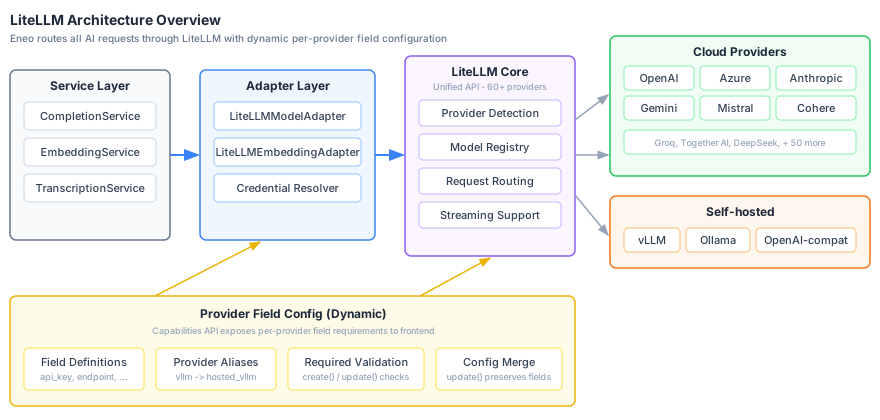
Set Credentials
curl -X PUT "https://eneo.example.com/api/v1/sysadmin/tenants/{tenant_id}/credentials/{provider}" \
  -H "X-API-Key: your-super-api-key" \
  -H "Content-Type: application/json" \
-d '{"api_key": "sk-..."}'Supported {provider} values: openai, anthropic, azure, mistral, ovhcloud, gemini, cohere
Credentials are encrypted with Fernet (AES-128-CBC + HMAC). Backup your
ENCRYPTION_KEY - if lost, all credentials must be re-entered.
Crawler Settings API
Configure crawling behavior per tenant.
Set Settings
curl -X PUT "https://eneo.example.com/api/v1/sysadmin/tenants/{tenant_id}/crawler-settings" \
  -H "X-API-Key: your-super-api-key" \
  -H "Content-Type: application/json" \
-d '{"crawl_feeder_enabled": true, "closespider_itemcount": 20000}'Enabling Features
After deployment, some features require additional configuration in the Admin panel.
Crawler & Document Upload
To use the web crawler or upload documents for processing, the worker service must be running and at least one embedding model must be enabled in Admin → Models → Embedding models.
Apps (Voice/Audio Features)
Can’t create Apps? This feature requires a transcription model. Go to Admin → Models → Transcription models tab and enable a model like Whisper.
Sysadmin API Access
To use system administration endpoints (tenants, credentials, crawler settings), set the API key in env_backend.env:
ENEO_SUPER_API_KEY=your-secure-api-keyModule administration
Configure modules in Admin → Modules with an ordinary signed-in
administrator holding the modules permission. The organization is derived
from the session; module administration does not require a separate environment
key or a tenant ID. The container side is covered in
Optional modules.
Troubleshooting
Common Issues
| Symptom | Likely Cause | Fix |
|---|---|---|
| Can’t login with default credentials | DEFAULT_* vars commented or db-init didn’t run | Uncomment vars in env_backend.env, check docker logs eneo_db_init |
| Can’t see Users page in Admin | USING_ACCESS_MANAGEMENT=false (default is true) | Set to true, restart backend |
| Frontend shows wrong API URL | PUBLIC_ENEO_BACKEND_URL incorrect | Set to the external origin (not localhost in prod) |
Browser requests hit /api/api/v1/… | PUBLIC_ENEO_BACKEND_URL ends with /api | Use the bare origin, e.g. https://eneo.example.com |
| Large file uploads fail | Admin policy or applicable operator ceiling is lower | Review configured, effective, and source values in Admin > File storage |
| ”Failed to decrypt credential” | ENCRYPTION_KEY missing or changed | Set correct key or re-enter credentials |
| Credentials API returns 404 | TENANT_CREDENTIALS_ENABLED=false | Set to true, requires ENCRYPTION_KEY |
| OIDC redirect fails | PUBLIC_ORIGIN mismatch | Must match in backend, frontend, AND the IdP redirect URI ({PUBLIC_ORIGIN}/login/callback) |
| Scheduled crawls never start | CRAWL_FEEDER_ENABLED=false | Set to true |
| Crawls/uploads not working | Worker not running or no embedding model | Check worker is running, enable embedding model in Admin → Models |
| Can’t create Apps | No transcription model enabled | Admin → Models → Transcription models tab, enable Whisper |
| JWT token invalid | Backend JWT_SECRET changed since the token was issued | Tokens signed with the old key are rejected; sign in again |
| Worker jobs stuck or slow | Worker overloaded | Reduce WORKER_MAX_JOBS or increase resources |
ECONNREFUSED 127.0.0.1:8000 | Frontend using localhost instead of Docker service | Set ENEO_BACKEND_SERVER_URL=http://backend:8000 (use service name, not localhost) |
| HTTP to HTTPS redirect broken | Missing Traefik label | Ensure traefik.enable=true label on traefik service |
| 502 Bad Gateway | Domain not replaced in docker-compose.yml | Replace your-domain.com in all 4 locations |
| SCIM provisioning returns 404 | Reverse proxy does not forward /scim | Route /scim/* to the backend (see Reverse Proxy Requirements) |
Debug Mode
Enable detailed logging for troubleshooting:
# In env_backend.env
LOGLEVEL=DEBUG
Then restart and view logs:
docker compose restart backend
docker compose logs -f backend
Service Health Checks
The backend is not published on a host port in the reference stack, so run these through your public domain (or from inside a container).
# Check all services are running
docker compose ps

# Liveness: the API process answers
curl -fsS https://your-domain.com/api/livez

# Health: backend, worker heartbeat, and object-content readiness (503 if the worker is unhealthy)
curl -fsS https://your-domain.com/api/healthz

# Readiness alias of /api/healthz on current images (older released images only have /api/healthz)
curl -fsS https://your-domain.com/api/readyz

# Detailed crawler diagnostics (requires the deployment's super API key)
curl -fsS https://your-domain.com/api/healthz/crawler \
  -H "X-API-Key: $ENEO_SUPER_API_KEY"

# Running backend version
curl -fsS https://your-domain.com/version

# Check database
docker compose exec db psql -U postgres -d eneo -c "SELECT version()"

# Check Redis
docker compose exec redis redis-cli ping

# View db-init logs (for first-run issues)
docker logs eneo_db_init
Container Logs
# All services
docker compose logs -f

# Specific service
docker compose logs -f backend

# Last 100 lines
docker compose logs --tail=100 backend worker
Maintenance
Version Pinning (Recommended)
Production deployments should pin to specific version tags instead of
using latest. This gives you control over when updates are applied and makes
rollbacks straightforward.
The example docker-compose.yml uses :latest tags for simplicity, but for production you should pin versions:
# Default (not recommended for production)
frontend:
  image: ghcr.io/eneo-ai/eneo-frontend:latest

# Production (pin to specific version)
frontend:
  image: ghcr.io/eneo-ai/eneo-frontend:v1.2.3
backend:
  image: ghcr.io/eneo-ai/eneo-backend:v1.2.3
worker:
  image: ghcr.io/eneo-ai/eneo-backend:v1.2.3
db-init:
  image: ghcr.io/eneo-ai/eneo-backend:v1.2.3
Find available versions:
- GitHub Releases: https://github.com/eneo-ai/eneo/releases
- Container Registry: https://github.com/orgs/eneo-ai/packages
Always run the latest released version to get bug fixes and security patches. Check the release notes before upgrading.
Backups
Take one paired recovery point when object-store rows exist. Inline-only control and bytes are both included in the PostgreSQL backup.
Database backup with pg_dump (recommended):
# Create timestamped database backup
docker compose exec -T db pg_dump -U postgres eneo | gzip > backup_$(date +%Y%m%d_%H%M%S).sql.gz

# Restore from backup (if needed)
gunzip -c backup_20250108.sql.gz | docker compose exec -T db psql -U postgres eneo
Volume backup (for complete recovery):
# Stop services first
docker compose down

# Backup PostgreSQL data volume
docker run --rm -v eneo_eneo_postgres_data:/data -v $(pwd):/backup ubuntu \
  tar czf /backup/postgres_volume_$(date +%Y%m%d).tar.gz /data

# Backup Redis data volume (optional)
docker run --rm -v eneo_eneo_redis_data:/data -v $(pwd):/backup ubuntu \
  tar czf /backup/redis_volume_$(date +%Y%m%d).tar.gz /data
If object-store rows exist, also archive eneo_eneo_object_content_data while
backend, worker, and the object-content service are stopped, or take the
matching versioned snapshot in your external provider. Follow the
object-content backup and restore
procedure, including
checksum and skew-recovery checks.
Updating Eneo
Update version tags (if pinned)
Edit docker-compose.yml and update version tags (e.g., v1.2.3 → v1.2.4).
Rename environment variables that are no longer read
From 2.2, db-init, the backend, the worker and the web app refuse to start
while a renamed variable is set without its replacement, and the web app
refuses to start without ENEO_BACKEND_URL. Before upgrading to 2.2, follow
Upgrading to 2.2.0.
Review network changes
If your current deployment predates the isolated-network template, recreating
the containers changes their network membership. External backup jobs or admin
tools that connected to db:5432 or redis:6379 over proxy_tier must run
through docker exec or attach to eneo_data_net.
Before the first recreate, choose the Compose invocation that matches the
deployment and keep it in both the deployment and rollback runbooks. Use plain
docker compose for PostgreSQL-inline content or an external S3-compatible
endpoint. If the retained .env points to
http://object-content:8333, use the bundled-store overlay and profile on
every command.
Drain work and stop old writers
For the release that introduces durable knowledge originals and staged legacy
File/Icon adoption, do not use a rolling docker compose up. Stop all backend
replicas, let the old worker drain its executable knowledge jobs, then stop all
old workers before starting db-init. The schema expansion installs a database
write fence because old File/Icon code still changes legacy payload columns.
Follow the File and Icon storage upgrade checklist. Keep the API closed until the new migration and same-release worker are ready.
Take the stopped-writer recovery point
After the drain is verified and every old writer is stopped, create the database backup:
docker compose exec -T db pg_dump -U postgres eneo | gzip > backup_$(date +%Y%m%d).sql.gzIf object-store rows exist, take the matching endpoint snapshot while writers remain stopped and label both artifacts as one recovery point. Inline-only content needs no second backup artifact.
Pull and deploy
For PostgreSQL-inline content or an external endpoint:
docker compose stop backend worker
docker compose pull
docker compose run --rm db-init
docker compose up -d
docker compose ps
For the bundled store:
docker compose \
  --profile object-content \
  -f docker-compose.yml \
  -f docker-compose.object-content.yml \
  config --quiet
docker compose \
  --profile object-content \
  -f docker-compose.yml \
  -f docker-compose.object-content.yml \
  stop backend worker
docker compose \
  --profile object-content \
  -f docker-compose.yml \
  -f docker-compose.object-content.yml \
  pull
docker compose \
  --profile object-content \
  -f docker-compose.yml \
  -f docker-compose.object-content.yml \
  run --rm db-init
docker compose \
  --profile object-content \
  -f docker-compose.yml \
  -f docker-compose.object-content.yml \
  up -d
docker compose \
  --profile object-content \
  -f docker-compose.yml \
  -f docker-compose.object-content.yml \
  ps
When any object-store endpoint is configured, verify its explicit readiness code. HTTP 200 alone can also represent an intentionally degraded object store while inline content remains available:
curl -fsS https://eneo.example.eu/api/readyz \
  | jq -e '.detail.object_content.code == "ready"'
Check online File and Icon adoption
db-init runs two consecutive revisions for this change. The first installs
the schema and write fence and commits. The second inventories legacy File/Icon
variants in resumable, idempotent groups without retaining the first revision’s
exclusive table locks. Neither revision copies payload bytes. The new worker
adopts them online in bounded batches. Follow its state after the deployment:
docker compose logs --since=30m worker \
| grep "File/Icon legacy backfill"activeneeds no operator action beyond capacity and application monitoring. Confirmcompletewith the durable campaign-state query in the storage guide; an empty installation may emit no completion log.waiting_for_capacitymeans Eneo remains available, but the estimated inline copy exceeds the automatic threshold. Confirm payload, WAL, replica, backup, and safety headroom before setting the reported acknowledgement.waiting_for_object_storemeans this release cannot adopt legacy bytes directly to the selected object store. Selecting PostgreSQL inline changes the deployment-wide target for eligible new writes. Keep it selected until adoption is complete, then reselect object storage and queue verified moves, or wait for a compatible release.haltedmeans the destination changed, or an invalid, oversized, or retry-exhausted item needs action. Fix the logged cause before increasing the resume revision. The worker retries older failures in bounded scheduled batches; a repeated failure waits for the next higher revision.
Do not edit the ledger or remove the database trigger. Existing legacy content remains readable while the worker waits or is stopped. See Upgrade File & Icon Storage for capacity examples, realistic duration, state queries, pause behavior, rollback, and cleanup.
Clean up old images
docker image prune -aRollback: Revert pinned version tags, stop writes, and restore the paired
backup. PostgreSQL-inline and external-endpoint deployments use plain
docker compose. A bundled-store deployment must use the overlay and profile
for stop, restore, and up; otherwise the store and its private network are
omitted.
docker compose \
  --profile object-content \
  -f docker-compose.yml \
  -f docker-compose.object-content.yml \
  stop backend worker object-content
# Restore the matching PostgreSQL dump and object-store snapshot as described
# in the linked procedure, then start the pinned versions:
docker compose \
  --profile object-content \
  -f docker-compose.yml \
  -f docker-compose.object-content.yml \
  up -d
curl -fsS https://eneo.example.eu/api/readyz \
  | jq -e '.detail.object_content.code == "ready"'
Restore the matching object-store snapshot before reopening traffic. See Back up and restore for skew recovery.
Scaling
The reference docker-compose.yml sets a fixed container_name on every
service, so docker compose up --scale ... is refused. To run more than one
backend or worker replica, define additional services without container_name
(or run the images under an orchestrator) and place the backend replicas behind
your load balancer. Additional workers are safe: only one crawl feeder runs
across all workers through leader election.
Related Documentation
- AI Provider Configuration - Configure AI models and providers
- Multi-Tenant OIDC Federation - Enterprise SSO setup
- Single-Tenant OIDC - Simple SSO setup
- SCIM Provisioning - Automated user and group provisioning
- SharePoint Integration - Connect SharePoint and OneDrive
- Module Authentication - Login handoff contract for optional modules
- Authentication Architecture - Technical authentication details
- System Architecture - Complete architecture overview
- Object Content Storage - Configure SeaweedFS, MinIO, backups, and readiness
- Release SBOMs and attestations - Verify shipped image digests and provenance